Save 60% on our first course with coupon WA01— limited time offer for all members. 

The Ideal Testing Pyramid in the Agentic Era

Nov 9

Key Takeaways

A testing pyramid still gives teams a clear way to spend their testing time. The difference is that agentic software can choose actions, call tools, retain context, and produce different valid outputs for the same prompt.

  • Keep unit, integration, end-to-end, and manual tests in the mix

  • Add checks for agent decisions, tool calls, memory, probabilistic outputs, and safety limits

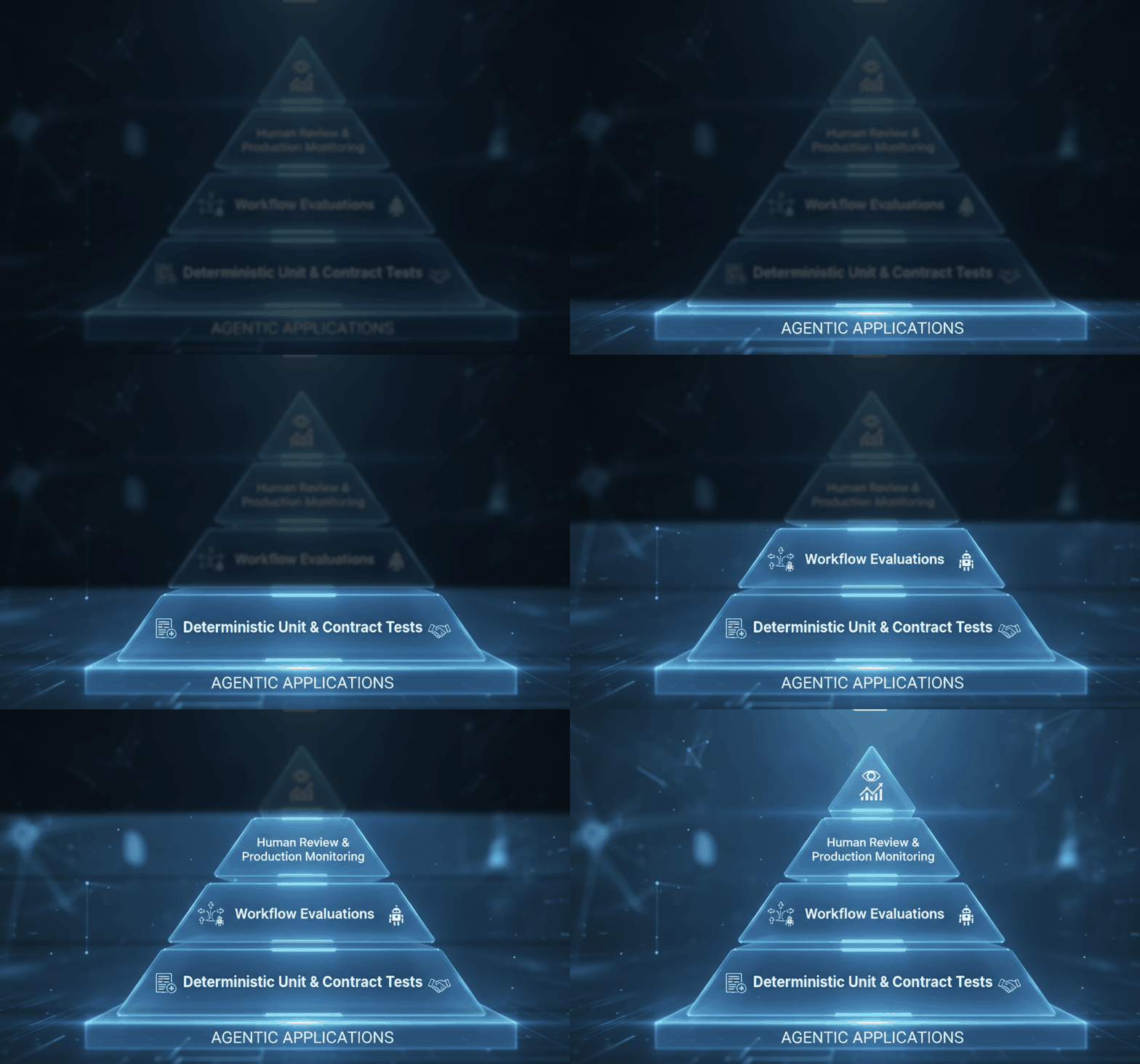
  • Put broad, fast deterministic checks at the base of the pyramid

  • Reserve slower scenario evaluations for workflows where context or action choices matter

  • Use human review and production monitoring when an automated check cannot judge quality with confidence


So, if you do one thing first, protect the base: test code paths, data rules, and tool contracts in seconds or minutes. A scenario test that takes 20 minutes and depends on a live model is useful for high-risk flows, but it fails as a replacement for hundreds of repeatable checks.

The common mistake is moving most effort to prompt-based end-to-end tests because the agent appears to own the whole experience. A balanced pyramid keeps conventional software quality checks broad, then adds focused evaluation at the top for behavior that is variable, context-dependent, or safety-sensitive.

Why your old testing pyramid breaks when software can reason and act

A release can pass 500 unit tests and a full end-to-end flow, then still give a customer the wrong answer. The failure may happen when an agent reads an ambiguous request, selects the wrong tool, or uses stale context, even though every individual function behaves as expected.

Traditional testing pyramids assume that software follows a known path from input to output. Agentic applications can choose among several paths, call tools in different orders, and change their response based on conversation history. That makes behavior harder to predict and reproduce.


Also, teams often spend more time tracing unstable agent behavior than fixing isolated code defects. A support agent might correctly retrieve an order record in one test, then attempt an unnecessary refund action in another because the wording, prior messages, or available tools changed.


If you do one thing, test the decisions around high-risk actions, not only the code that performs them. By the end of this post, you will be able to design a practical testing pyramid that keeps fast code checks at the base while adding decision tests, human review, and production checks where agent behavior creates risk.

Keep the foundation fast with deterministic code and contract tests

Next, keep the fastest layer focused on code that should give the same result every time. Retain broad unit coverage for business rules, prompt utilities, parsers, input validation, and guardrail code, so a defect is found before an agent workflow has to run.

For example, a parser should turn a known provider response into the same structured object on every run, and a permission check should deny a support agent access to payroll records. If you do one thing, make these tests run on every change and keep most of them under a few seconds.


Also, add contract tests at the boundaries where your code depends on another system. A contract test checks that an expected request, response shape, schema, permission rule, or failure case still works as agreed.


Prioritize contracts for:

  • Model providers, including timeouts, malformed output, and rate-limit responses

  • Tools and APIs, including required fields, authentication failures, and changed response fields

  • Schemas that validate tool inputs and model outputs

  • Permission rules for roles such as customer support, finance, and administrators

  • Failure responses such as unavailable services, empty results, and rejected requests


A common mistake is using a live model call to test a utility function. That test may fail because of latency, a model update, or a temporary provider issue rather than a code defect. Use fixed fixtures for deterministic code, then reserve live calls for boundary contracts and workflow-level checks.

Test agent decisions where workflows and context create risk

Next, test the decisions that sit between reliable code checks and final human review. An agent can call the right tool but still choose the wrong sequence, retrieve an outdated policy, or carry a detail from one task into another when it should not.

Build scenario tests around the moments where context changes the outcome. For a support agent, test whether it checks account status before suggesting a refund. For an operations agent, test whether it confirms missing inputs before creating a report rather than filling gaps with guesses.

Create scenarios for the decisions that matter

Cover the full workflow, not only the final reply. A useful set of scenarios can check:

  • Planning: does the agent break a three-step task into a sensible order

  • Tool selection: does it choose an approved knowledge source instead of searching unrelated records

  • Retrieval quality: does it pull the current document and cite the relevant passage

  • Memory use: does it retain a stated preference during one task without carrying it into a different customer case

  • Multi-step completion: does it verify each tool result before moving to the next action

If you do one thing, start with the five workflows that handle the highest volume, money, customer data, or approval risk. A scenario that takes 10 minutes to write can catch a repeated error before it reaches hundreds of real interactions.

Score observable behavior, not one perfect answer

But do not grade every test against one exact sentence. Model wording can vary while the work is still correct, so define observable success criteria such as whether the agent asked for a missing order number, selected an allowed tool, flagged uncertainty, and stopped before an unapproved action.

A common mistake is scoring only a polished final response. Fix this by recording the plan, retrieved sources, tool calls, and completion state, then checking each against the scenario rules. This works best for repeatable workflows; it fails when success depends mainly on tone or a judgment call that requires a person.

Include cases designed to make the agent fail safely

So, add adversarial cases before users create them for you. Give the agent conflicting instructions, incomplete records, an unavailable tool, or a request that should be refused, and check that it identifies the problem instead of forcing a result.

For example, a finance assistant receiving “send the payment now” after a later message says “wait for approval” should pause and request a clear decision. When a required lookup tool is unavailable, the right outcome may be a short status note and escalation, not an invented answer.

Reserve human evaluation and production monitoring for what automation cannot settle

That said, automated checks cannot reliably judge whether an agent sounds trustworthy, handles an ambiguous request helpfully, or makes the right tradeoff in a high-impact case. Use structured human review for scenarios such as a support agent declining a refund, a hiring assistant handling sensitive applicant details, or a research agent summarizing conflicting sources.

Give reviewers a short scorecard with defined criteria: factual accuracy, clarity, tone, appropriate escalation, and whether the agent stayed within its allowed actions. Ask two reviewers to score a small shared sample at first, such as 20 conversations, so you can spot where the rubric is unclear. Human review works best for nuance and rare edge cases; it becomes slow and inconsistent when used for every routine interaction.


Next, watch production behavior because a passing pre-release test suite cannot show every real tool failure, unusual user request, or context gap. Track a focused set of signals for each important workflow:

  • Task success rate, such as completed account updates or resolved support requests

  • Tool errors, retries, and timeouts

  • End-to-end latency, including time spent waiting for external systems

  • Cost per completed task and unusually long model responses

  • Safety signals, including blocked actions, policy flags, and escalation rates

  • Behavior drift, such as a drop in citation quality or a rise in unnecessary tool calls


If you do one thing, connect these signals to real examples. A 12% rise in tool retries matters more when you can inspect the traces and see that the agent now repeats a failed search instead of asking the user for a missing detail.


So, treat each incident as new test input rather than a one-time fix. When an agent sends an outdated answer, calls the wrong tool, or stops after a partial result, save a scrubbed version of that scenario, define the expected outcome, and add it to the relevant workflow test set.

A common mistake is fixing only the prompt that caused the failure. The better fix is to add a regression scenario that checks the decision, tool call, and final response, then monitor the same signal after release. Over time, real production failures fill the gaps between your deterministic foundation, workflow evaluations, and human judgment.

What to prioritize in your agent testing plan

So, test the code, evaluate the behavior, and observe the system. Agentic software needs all three because correct code can still make a poor decision, and a sound decision can still cause harm when deployed in the wrong context.


Start with the failure that would cause the greatest harm for your users. A support agent sending an incorrect refund may need workflow checks first, while an operations agent changing account permissions may need strict approval gates, audit logs, and human review before it acts.


If you do one thing next, map each high-risk action to the first layer that should catch it:

  • Use deterministic and contract tests for code errors, tool inputs, and expected outputs

  • Use workflow evaluations for wrong routing, missing context, and unsafe multi-step decisions

  • Use human review for judgment calls where the acceptable answer depends on nuance

  • Use production monitoring for failures that appear only with real users, data, or tool conditions

The goal is not to prove that an agent will never fail. It is to find failures early, limit the damage when one gets through, and learn from the behavior you observe after release.

Build stronger agentic QA skills