Save 60% on our first course with coupon WA01— limited time offer for all members. 

How to Evaluate AI Chatbots with Playwright, Jev, and DeepEval

Automate chatbot evaluation with Playwright, Jev rules, and DeepEval metrics. Catch regressions in CI. Learn the workflow—start now.
Sep 26 / QA Olympians Academy

Key Takeaways

  • Use Playwright to capture what users actually type and what the chatbot actually returns, straight from the live UI

  • Run jev checks first for fast, rule-based validation, then use DeepEval for graded, metric-driven evaluation

  • Build a repeatable evaluation harness and run it in CI so prompt updates and model changes do not silently regress quality

When your chatbot looks fine in demos but fails in production

A response can pass a quick spot-check in a demo and still be wrong for real users by tomorrow. The common pattern is simple: the demo covers the happy path, while production traffic brings messy phrasing, missing context, older account states, and requests that mix two intents into one message.

Here’s a useful benchmark to keep in mind: manual review typically catches under 30% of edge cases. That means even a careful reviewer can miss the exact combination that breaks your bot, like a user asking for a refund while referencing an expired trial and a second email address.

So the goal is not to “review more,” it’s to build an automated loop that keeps discovering failures after every change. If you do one thing, do this: turn real user conversations into repeatable tests, then run them on every build so regressions show up in hours, not after support tickets pile up.

A simple loop looks like this:

  • Collect a small daily sample of real chats from the UI, including the user message, key UI state, and the bot’s final answer

  • Tag obvious risk factors like "ambiguous request", "policy question", "account-specific", or "multi-step"

  • Re-run those chats automatically against the latest build and compare results to what users accepted last week

  • Escalate only the suspicious deltas for deeper grading

If you’re short on time, skip trying to label every possible edge case up front and focus on capturing 20 to 50 real conversations per week. But here’s the catch: teams often store only the raw prompt and answer, then wonder why tests still miss failures. The fix is to capture the surrounding UI context too, like account tier, locale, and which page the user was on, because those often change the correct answer.

Capture real conversations from the UI with Playwright

Also, if your evaluation only hits an API, you can miss the failures users actually feel: the wrong button click, a stale session, a hidden retry, or a UI-only safety banner. A UI-driven capture makes the transcript match the real product, including what the user saw and when they saw it.

Start by making your Playwright test stable: pick selectors that do not change with styling, define a reliable reset step, and standardize what counts as a “turn” in the conversation. If you do one thing, do this: make every run start from a clean chat state, so a previous message does not quietly change the next reply.

Define selectors, reset steps, and a capture format you can diff

Next, define three selector groups and keep them in one place:

  • Message list container (where assistant and user bubbles appear)

  • User input and send button (or Enter key behavior)

  • Any UI state signals you care about (loading spinner, error toast, rate-limit banner)

Here’s the catch: selectors that target CSS classes often fail when the UI is restyled. Works best when you use stable attributes like data-testid or ARIA roles, fails when you rely on deep DOM paths. If you are short on time, add data-testid to the message bubbles and send button first, then improve the rest later.

Persist per-run artifacts so you can debug regressions fast

So, treat each test run like a mini incident report and save the same artifacts every time. A simple run folder naming pattern like runs/2026-09-26T10-15-32Z/ helps you compare before and after changes in minutes.

Capture at least:

  • Raw transcript in a structured format (JSON) with role, text, turnIndex

  • Timestamps per message (even just sentAt and receivedAt) to spot slowdowns like 2s vs 12s

  • Screenshots at key points (after reset, after each assistant reply, on any error)

  • Network logs when available (requests, response codes, and any streaming events)

A common mistake is saving only screenshots. The fix is to always write the transcript to disk too, because it is what later grading tools can read and score.

Validate outputs quickly with jev before deeper grading

Next, you want a fast gate that catches obvious failures before you spend time and money on deeper scoring.

jev works well here because you can express simple, non-negotiable checks and run them across hundreds of chatbot turns in minutes, then save the richer evaluation for the runs that pass the basics.

Start by choosing a small set of hard rules that match your product risk. If you do one thing, make the rules binary and easy to explain to a teammate in 30 seconds.

Common “hard rule” set to begin with:

  • Must-answer: did the bot give a direct answer or a clear next step within 1 to 3 sentences

  • Forbidden content: banned instructions, unsafe advice, or internal notes that should never appear

  • JSON validity: for tool calls or structured outputs, is it valid JSON and does it match the expected keys

  • Key facts present: did it include required fields like date range, currency, plan name, or a cited policy snippet when your flow needs it

Here’s the catch: hard rules are great at telling you “this is broken,” but they do not tell you “this is helpful.” They work best when your bot has clear constraints (support scripts, data-entry flows, tool calling), and they fail when the user’s request is open-ended (brainstorming, creative writing) unless you keep rules minimal.

A common mistake is writing rules that are too clever, like checking “tone” or “clarity” with brittle pattern matching. Fix it by keeping jev focused on compliance and structure, then letting deeper graders handle nuance.

Also decide failure behavior up front so results stay consistent from run to run.

  • Stop on critical violations when a single issue makes the response unusable (invalid JSON for an API call, disallowed content, missing required identity checks)

  • Tag-and-continue when you want a report of everything that went wrong across a batch (missing key facts, format drift, partial answers)

If you’re short on time, start with stop-on-critical for 2 rules (forbidden content and JSON validity) and add must-answer and key facts once your pipeline is stable.

Score quality and regressions with DeepEval metrics

Next, once your UI capture is stable and quick checks pass, you need a scoring layer that turns “seems fine” into a number you can track week to week. The goal is not a perfect grade for every response, but a reliable signal that catches prompt, UI, or model drift before users do.

If you only do one thing, pick 2 to 4 metrics that match how your chatbot can fail in real usage. More metrics can add noise and slow runs, so start with what maps to your biggest risk and expand only when you see gaps.

Pick metrics that match the failure you care about

Also, different use cases call for different grades, and the wrong metric can give you false confidence. A support bot that must cite policy needs different checks than a writing assistant that must follow formatting rules.

A practical starter set looks like this:

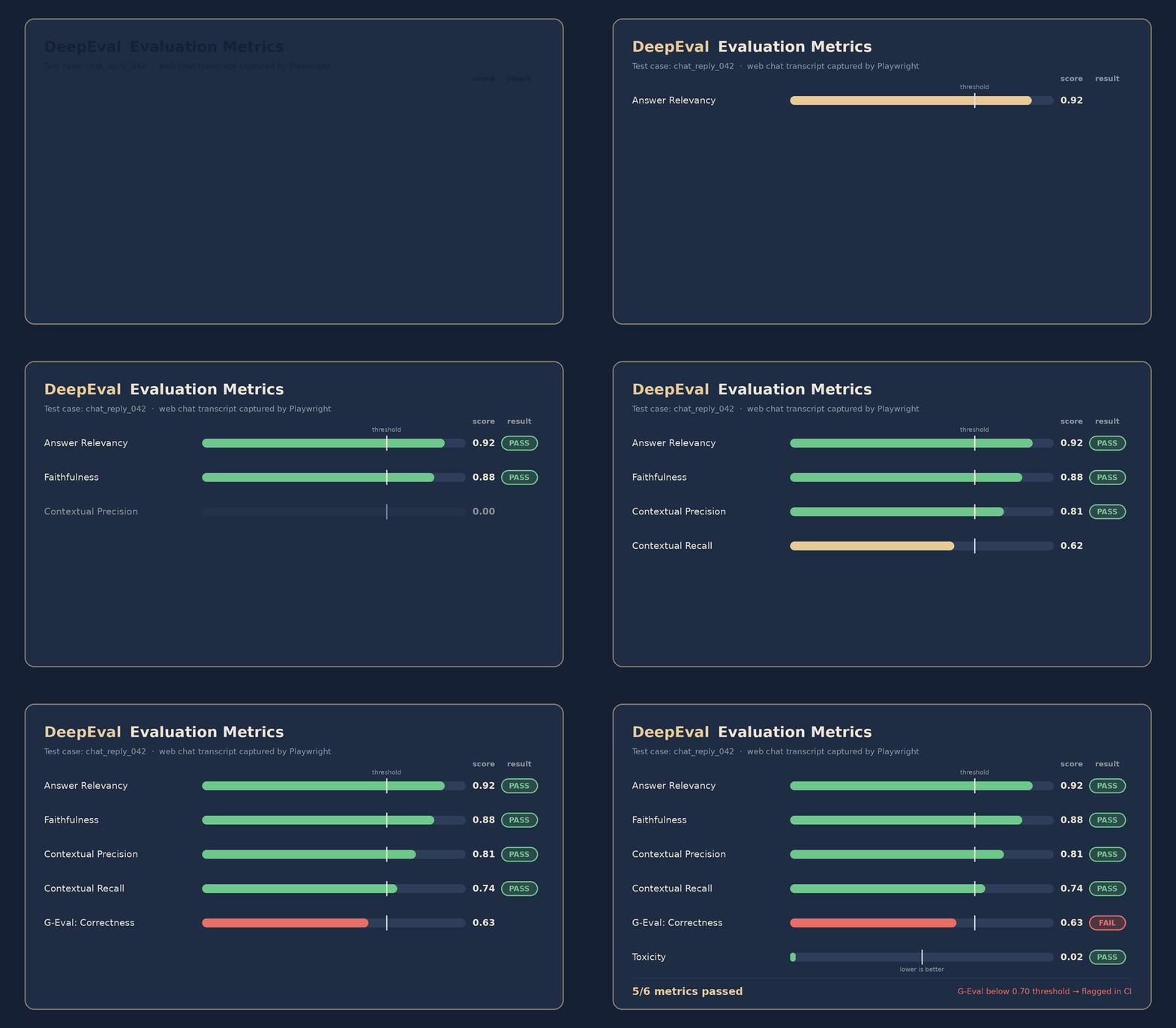
  • Faithfulness: checks whether the answer stays grounded in the provided context, not invented details

  • Relevance: checks whether the response answers the question asked, not a nearby question

  • Correctness: checks whether the final answer is actually right for tasks with a clear expected output

  • Formatting: checks structure requirements like JSON shape, bullet lists, headings, or required fields

  • Toxicity: checks for harmful or unsafe language where it must never appear

Here’s the catch: some metrics work best when the task has clear reference material, and they fail when the task is open-ended.

  • Correctness works best when you have an expected answer, a rubric, or a known data source

  • Correctness fails when the user requests brainstorming or creative writing, so favor relevance and formatting there

  • Faithfulness works best for RAG (retrieval-augmented generation) flows where you pass documents into the prompt

  • Faithfulness fails when you do not provide source context, because there is nothing to be faithful to

Set thresholds and compare against a baseline to catch drift

That said, a score is only useful if you decide what “good enough” means and you keep a baseline run. Treat your first stable run as your reference point, then compare future runs to detect regressions caused by prompt edits, UI changes, or a model version swap.

A simple way to start:

  • Choose a pass threshold per metric (for example, stricter for toxicity and formatting, looser for relevance)

  • Record baseline scores for a fixed set of test conversations (10 to 30 is enough to begin)

  • Block merges when a metric drops below threshold or when the average drops by a set amount compared to baseline

  • Review failures by category so you can fix the right layer: prompt, retrieval, UI wiring, or model settings

Common mistake: setting one global threshold for everything, then spending hours arguing about a single borderline score. Fix: set different thresholds for different risks, and add a small “allowed drop” window so tiny fluctuations do not fail every run.

If you’re short on time, skip building a large test set and start with your top 10 real user conversations. Run DeepEval on those after any prompt change, and you will still catch most regressions that matter.


Closing remarks

Next, remember the simple rule that keeps chatbot quality from drifting: what gets measured gets improved.

A demo that feels good is useful for direction, but it is not a safety net. A pipeline that proves the same behaviors every release is what earns trust, especially when you ship weekly, change prompts often, or swap models. If you do one thing, make evaluation a release gate so regressions show up in minutes, not after users complain in support tickets.

Build QA automation skills for AI features