Agentic Mobile Test Automation: Why Now and How to Build Your First Agentic Workflow
Key Takeaways
Agentic mobile automation is still Appium at the core, but it adds agents that can plan steps toward a goal, adapt when screens shift, and recover when locators break. The practical difference is fewer brittle scripts and more runs that can self-correct when a button moves or a modal shows up.
You can build an end-to-end workflow by combining Appium for execution, MCP (a simple way to let tools and an agent share context) for tool access and state, and LLM agents for decision-making. In practice, a single run can reroute around a changed onboarding step, retry with a different selector after a timeout, and keep a clear trace of what it tried.
By the end of this post, you should have a practical blueprint to pilot resilient, context-aware mobile automation on one high-value user journey in about 60 to 90 minutes of setup. If you only do one thing, start with a scenario that fails often in CI, like login plus a key purchase-flow screen, so you can measure before-and-after stability.
Agentic mobile automation combines Appium execution with agents that plan, adapt, and recover from UI changes
You can build an end-to-end workflow using Appium, MCP, and LLM agents to run goal-driven mobile tests
You will learn a practical blueprint for piloting resilient, context-aware mobile automation
When your mobile suite runs scripts but your app changes every day
Release week hits, and the suite that used to give you confidence turns into a triage queue. A designer tweaks a button label, a developer moves a view into a new container, and suddenly your “red” tests are mostly locator misses, timing flakiness, and brittle assumptions instead of real regressions.
If you’re seeing a steady stream of failures that disappear after re-running or “fixing the selector,” your problem is not a lack of coverage. It’s that your automation is built like a fragile script runner in a system where the UI is changing daily, sometimes hourly.
Here’s a measurable signal to watch: if roughly 15–30% of UI failures are non-product issues, architecture is the fix, not writing more scripts. The common mistake is to respond by adding retries, longer waits, and more locator rules, which often:
Increases run time from minutes to hours
Hides real issues behind noise
Creates a maintenance backlog that grows every sprint
If you do one thing, do this: start tagging failures as “product bug” vs “automation issue” for a week, then total them by device and screen. That single report tells you where an agent loop can buy back the most time.
So the goal shifts from “run steps exactly” to “reach an intent even when the app changes.” Works best when the UI still has recognizable structure (labels, accessibility IDs, stable flows) and fails when the app provides almost no semantic hooks or the environment is unstable (frequent network timeouts, inconsistent test data).
By the end of this section, you should be able to describe three things in plain language:
The stack: what drives the device, what observes the UI, and what decides the next action
The agent loop: observe → plan → act → verify → recover when a step fails
Your first build plan: pick one high-value flow (10–15 steps), define pass criteria, and set a time box (for example, one afternoon) to produce a demo that survives small UI shifts
Why now: what changed in mobile automation architecture
Next, the big shift is that mobile automation is no longer only "write a script, replay it later." Script-first suites assume stable screens and stable selectors, so the test runner just executes steps. Agent-guided systems start from a goal, then reason over context, app state, and what is visible on the device to decide the next action.
In plain English: a script is a fixed recipe, while an agent is closer to a junior QA who can adapt when the button label changes or a screen loads differently. This works best when the agent can read live UI state (what elements exist, their text, whether a screen is loading) and use that to choose actions. It fails when the only signals you give it are brittle selectors and a vague goal.
Also, the timing is driven by pressure points that have gotten worse for mobile teams over the last few years. If your app ships daily or several times a week, a suite built on fixed paths will drift out of sync fast. The result is not only failures, but time spent triaging failures that are not product bugs.
Here’s why the maintenance curve is steep right now:
App velocity: UI flows change in small ways every sprint, so yesterday’s exact click-path is often wrong today
Device fragmentation: one test may behave differently on a small Android device vs a large iPhone because layouts and system dialogs differ
Flaky selectors: dynamic IDs, reused components, and animation timing turn "find element" into a recurring source of false failures
Rising maintenance cost: when every change forces updates across dozens of scripts, test coverage becomes a tax instead of a safety net
That said, if you do one thing, stop treating selectors as your source of truth. Prefer higher-signal cues such as visible text, accessibility labels, and screen-level assertions, then let an agent decide which control matches the intent. If you’re short on time, keep your existing scripts but add one agent layer that handles the top 20 percent of flaky interactions (logins, permission prompts, and onboarding) before you attempt full agent-driven flows.
A common mistake is to adopt "agent" tooling but keep the same brittle script design underneath. The fix is to separate intent from mechanics:
Intent: "Log in as a returning user and reach the home screen"
Mechanics: taps, typing, waits, and whether a permission dialog appears
When you treat mechanics as something that can change per device and per build, agent-guided automation becomes a practical response to today’s architecture problems, not a research project.
The agentic stack blueprint: Appium, MCP, and custom LLM agents
Next, think of an agentic mobile test setup as a stack with clear responsibilities. If you do one thing, separate “deciding what to do” (the agent) from “doing it on the device” (the execution layer), because most flakiness comes from mixing the two.
A practical blueprint usually has six pieces you can reason about and swap independently.
Core components and what each one owns
Also, here are the core components, in plain terms, with a simple ownership boundary for each:
Execution layer (Appium): runs actions on real devices and emulators, returns raw results (element found, tap succeeded, screenshot captured)
Context inspection: turns device state into signals the agent can use (view hierarchy, focused element, current screen name, network or logs when available)
Planning: breaks a goal into steps, and chooses what to do next when the UI does not match expectations
Tool-calling: the glue that lets the agent request actions like
find,tap,type,wait,assert,screenshot,pullLogs, and then receive structured outputsMemory: stores what the agent learned during the run (for example, “Login button appears only after dismissing the upsell modal”) so it can avoid repeating mistakes 10 minutes later
Guardrails: rules that limit risk and keep runs reproducible (timeouts, max step count, allowed actions, PII redaction, and a required stop condition when confidence is low)
A common mistake is to let the model talk directly to Appium with loosely formatted prompts. Fix it by forcing all actions through typed tools with strict schemas, then log every tool call and response so you can replay failures.
Where MCP fits, and why it matters
That said, MCP (Model Context Protocol) is where you standardize the tool layer and context flow, so your agent can call tools in a consistent way. In practice, MCP is helpful when you have more than one agent or more than one tool source, for example:
One MCP tool server wraps Appium actions and returns structured results plus screenshots
Another MCP tool server exposes a “test data” tool (create user, reset account state)
A third MCP tool server exposes “observability” tools (fetch device logs, crash reports)
Here’s the catch: MCP does not make tests stable by itself. It makes the boundary between decision-making and execution explicit, which makes stability fixes and debugging faster because you can pinpoint whether the failure was a bad plan, bad UI state, or a flaky device action.
Where Maestro fits alongside Appium
So where does Maestro fit when Appium is already the execution layer. Maestro can sit in the context inspection and UI traversal part of the stack, because it is often faster for exploring screens and extracting hierarchy-level signals the agent can use to decide.
Works best when you need quick screen understanding and high-level navigation cues, like “which buttons are visible” or “what text labels exist on this screen”. Fails when you need deep, device-specific control or a very custom action, where Appium’s broader driver coverage and capabilities are usually the safer choice.
If you’re short on time, start with this split:
Use Maestro signals for fast UI understanding and choosing the next action
Use Appium tools for the action itself, plus screenshots and assertions you want to standardize
Use guardrails to stop the run after a set number of steps (for example 30 to 60) and fall back to a human-readable report

Build the end-to-end agentic workflow you can demo in one session
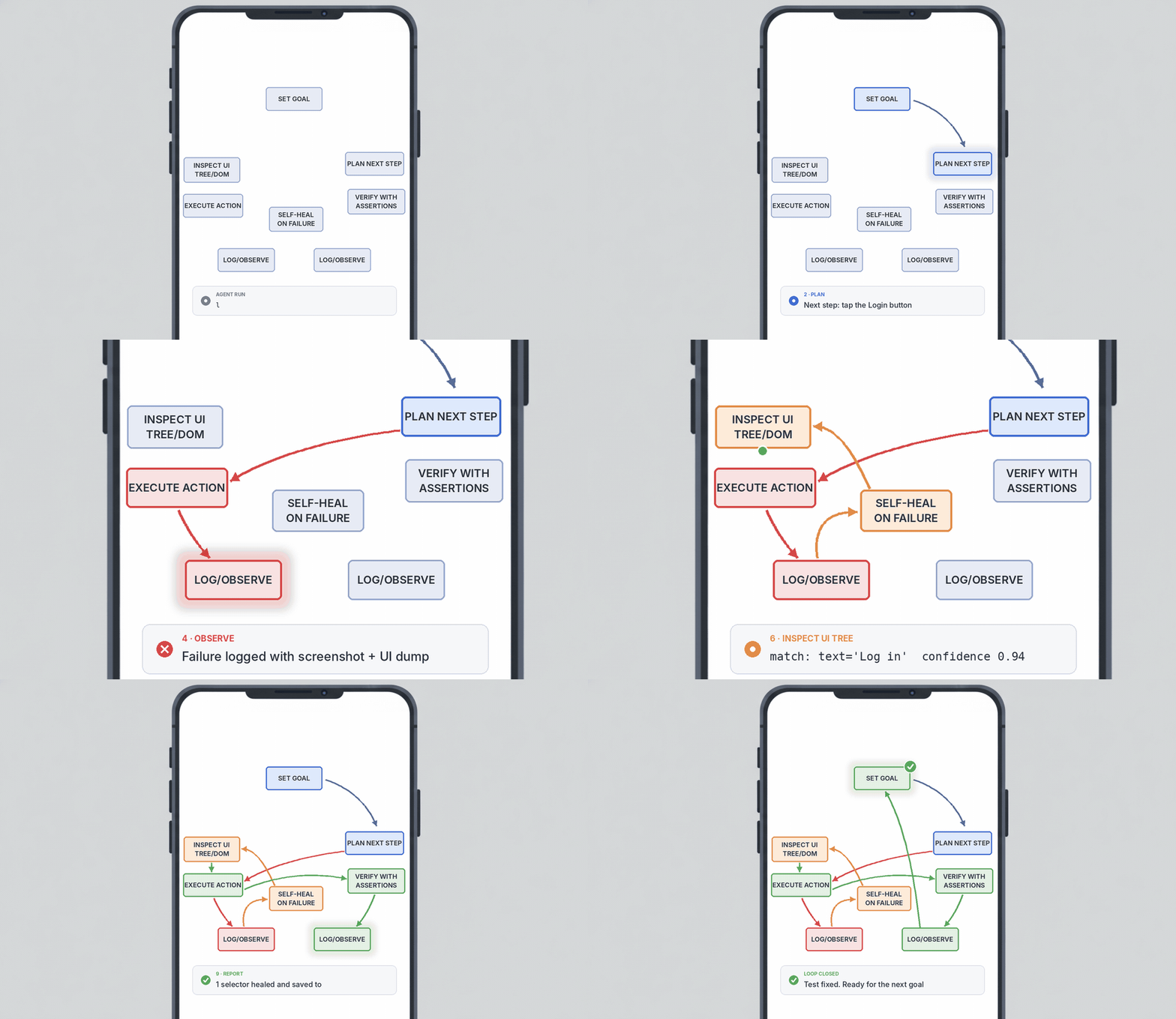
Next, build a single loop you can run live in 30 to 60 minutes, not a sprawling “AI does testing” story. The workflow should repeat the same cycle every step: set a goal, inspect the current UI state (DOM or accessibility tree), plan the next action, act, verify, self-heal if needed, and log everything for observability.
A practical demo scope is one critical user journey, like “log in, search for an item, add to cart, and reach checkout” across 12 to 25 screens or state changes. If you do one thing, make the goal and the verify steps explicit, because that is what keeps the agent from wandering when the app UI shifts.
Set a goal: a short, testable sentence like “User can reach checkout with one item”
Inspect: capture UI tree + key attributes (labels, enabled state, bounds) and a screenshot if needed
Plan: pick 1 next action and 1 backup action (for example, use search field, else open category)
Act: execute a single Appium command (tap, type, swipe, back)
Verify: use deterministic assertions (text present, element visible, screen id) not “looks right”
Self-heal: if locator fails, re-find element by role or label, then retry once
Observe: log step, UI snapshot hash, action, assertion result, and timing
That said, autonomy without constraints turns a demo into a live debugging session. Add guardrails that control what the agent is allowed to do, how long it can try, and when it must ask for a human decision.
Approved actions only: whitelist actions like tap/text/swipe, and block risky actions like delete, purchase, logout unless explicitly allowed
Timeouts: cap the run (for example, 10 minutes) and cap each step (for example, 20 to 40 seconds)
Deterministic assertions: define 1 to 3 checks per screen (screen title, key element, URL/deeplink state if applicable)
Human review points: pause on ambiguous choices (two similar buttons) or any action that changes account state
Here’s the catch: this loop works best when the app has stable semantic signals (accessibility labels, IDs, roles), and it fails when everything is anonymous “View” nodes. If you’re short on time, skip fancy planning and implement just Goal → Inspect → Act → Verify with strict assertions, then add self-heal and deeper logging after the first demo run.
Closing remarks
The future of automation is not more scripts, it’s better systems. If your suite depends on brittle selectors and long chains of steps, you will keep spending time on rewrites instead of learning what actually broke and why.
Next, pick one place to start: locators, flows, or debugging. If you do one thing, start with self-healing locators because it is the smallest change with the fastest payoff, and you can measure it in fewer retries and less time spent on selector cleanup.
Here’s the catch: reasoning and self-healing work best when your tests have clear intent and stable signals, and they fail when your suite is a pile of copied steps with unclear assertions. A common mistake is trying to “agentify” everything at once; fix it by choosing one high-value user journey, adding tidy logging, and defining what success looks like in a single number like minutes to diagnose a failure.
Which part of your current mobile suite would benefit most from reasoning and self-healing: locators, flows, or debugging